Select your language
Choose Language | Choisir la langue | Elegir idioma | Scegli la lingua | Escolher idioma


Artikel - ZipDownloads
ZipDownloads – Frequently Asked Questions
This FAQ explains the most important ZipDownloads features from the perspective of administrators and users. It focuses on download keys, protected downloads, Free/Pro/Enterprise editions, purchase entitlements, renewals, and upgrades. What is a download or license…
ZipDownloads – Professional Download and Update Management for Joomla (English)
English - ZipDownloads – Professional Download and Update Management for Joomla ZipDownloads is a powerful Joomla extension for centrally managing, categorizing, and securely providing downloadable files. It is suitable both for traditional download sections and…
There are currently no matching articles.
Page 1 of 1
Joomla 5/6
Joomla 5/6
Joomla 5/6 Erweiterungen
RegioFirewall – greater security and control for your Joomla website
Your website is accessible every day – including to unwanted visitors, suspicious bots and automated attack attempts. RegioFirewall helps you identify suspicious access, apply protection rules effectively and keep track of security events. The extension…
Functional Description – RegioTicket
RegioTicket is a support and ticket system fully integrated into Joomla 5 and Joomla 6. The extension makes it possible to record support requests in a structured way through the frontend, process them in the…
RegioTicket – Professional Ticket System Directly in Joomla
With RegioTicket, your Joomla website becomes a powerful support and service platform. The extension enables you to record customer enquiries, error reports, technical problems and general support cases in a structured way, manage them centrally…
Professional Joomla Extensions on holger-lemke.de
Anyone who wants to get more out of Joomla needs extensions that not only add useful functionality but also integrate reliably into existing websites. At holger-lemke.de, you will find a growing selection of professional Joomla…
Frequently Asked Questions about DigitalSignage
General Questions 1. What is DigitalSignage? DigitalSignage is a Joomla 5/6 extension for centrally creating, managing, and distributing digital screen content. Images, videos, RSS feeds, HTML displays, and other media can be combined into slides,…
ZipDownloads – Frequently Asked Questions
This FAQ explains the most important ZipDownloads features from the perspective of administrators and users. It focuses on download keys, protected downloads, Free/Pro/Enterprise editions, purchase entitlements, renewals, and upgrades. What is a download or license…
Witziges
Witz des Tages
Keine Witze hinterlegt.
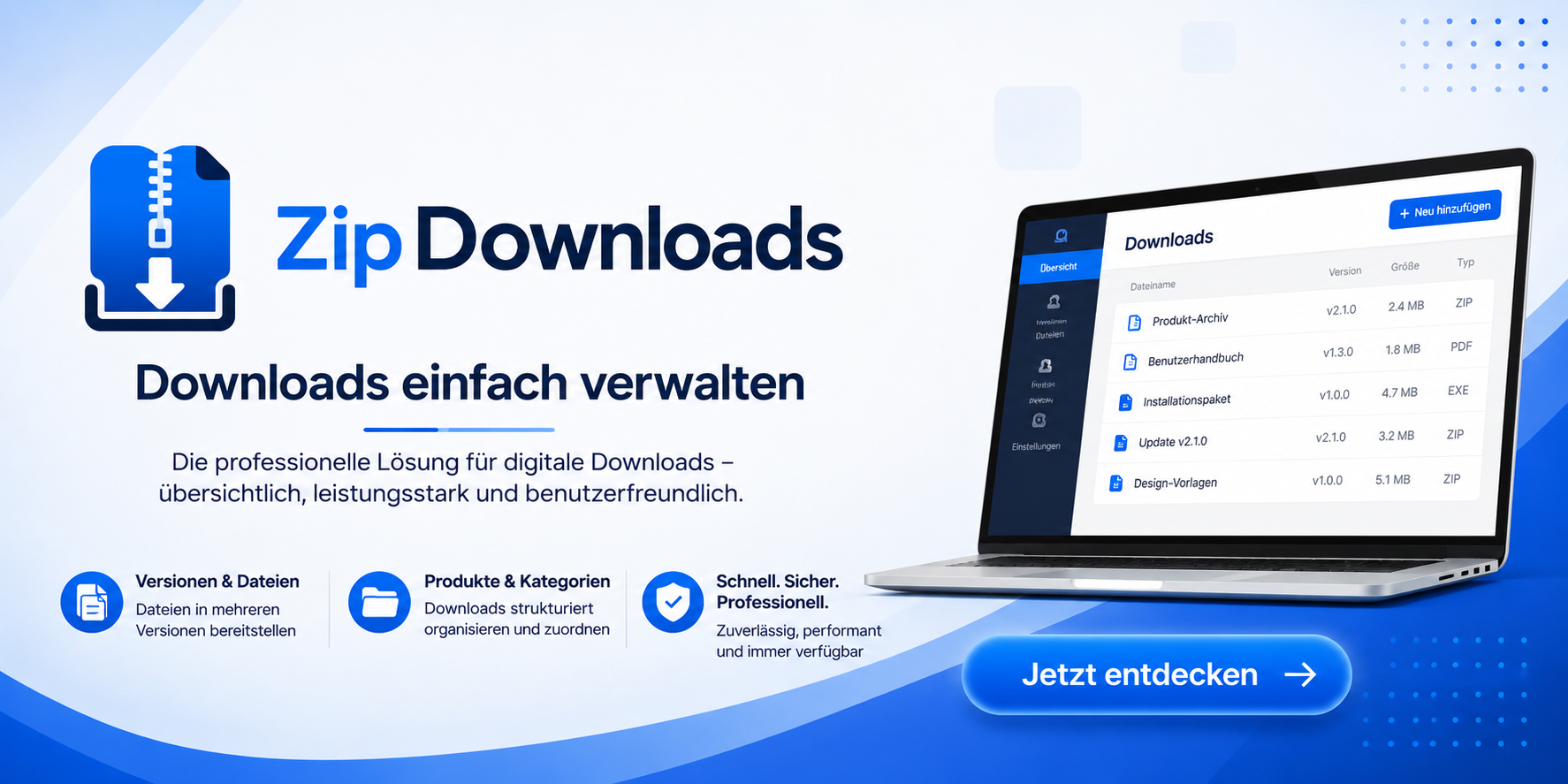
ZipDownloads ist eine leistungsfähige Download- und Produktverwaltung für Joomla. Die Erweiterung ermöglicht die strukturierte Bereitstellung und Verwaltung von Dateien, Kategorien, Versionen, Changelogs, Dokumentationen und Screenshots. Zusätzlich unterstützt ZipDownloads Produkt- und Zahlungsfunktionen, Gutscheine, mehrsprachige Inhalte sowie umfangreiche Import-, Export-, Backup- und Wiederherstellungsfunktionen. Damit eignet sich die Lösung sowohl für einfache Downloadbereiche als auch für professionelle Software-, Datei- und Produktportale mit zentraler Versions- und Releaseverwaltung.
- Details
- Written by: Holger Lemke
- Category: ZipDownloads
- Hits: 54
This FAQ explains the most important ZipDownloads features from the perspective of administrators and users. It focuses on download keys, protected downloads, Free/Pro/Enterprise editions, purchase entitlements, renewals, and upgrades.
What is a download or license key?
A download key is a unique access key that allows ZipDownloads to verify whether a user is authorized to download specific products or versions.
A key can, for example, be linked to a purchase, product version, edition, or specific user.
ZipDownloads supports, among other things:
-
time-limited keys
-
unlimited-validity keys
-
download limits
-
installation limits
-
installation IDs
-
usage history
-
expiration dates
-
blocking
-
revocation
-
refunds
-
key regeneration
-
access to specific release channels
Is a download key the same as a software license key?
Not necessarily.
In ZipDownloads, the key is primarily used to control official download, update, or service access.
For open-source software, a download key must not be used to restrict rights granted, for example, by the GPL. The key therefore controls access to the official download or update service, not the legal or licensing rights associated with software that has already been obtained.
Can a download be made available exclusively with a valid key?
Yes.
A product can be configured so that a download is only possible if a valid entitlement exists.
ZipDownloads can check, among other things:
-
Does the user have a valid key?
-
Is the key active?
-
Has the key expired?
-
Has the key been blocked?
-
Has the key been revoked?
-
Has the order been refunded?
-
Has the download limit been reached?
-
Has the installation limit been reached?
-
Is the user authorized for the relevant release channel?
The existing key logic includes the statuses active, expired, blocked, revoked, and refunded.
Can free downloads be offered without a key?
Yes.
ZipDownloads supports both:
-
public downloads
-
protected downloads
A free product can therefore be made available without registration or a key if it is configured accordingly.
Can a free download also require a key?
Yes.
“Free of charge” and “freely accessible” are two different properties.
For example, a product can cost EUR 0.00 while still only being available to registered or authorized users with a download key.
This can be useful for:
-
customer areas
-
downloads requiring registration
-
internal software
-
trial versions
-
partner downloads
-
time-limited promotions
Which editions does ZipDownloads support?
ZipDownloads supports, among others, the following editions:
-
Free
-
Pro
-
Enterprise
-
Standard
This makes it possible to offer several feature tiers of the same product.
Can a user upgrade from Free to Pro?
Yes.
ZipDownloads explicitly supports editions and upgrades, including:
-
Free → Pro
-
Pro → Enterprise
Different prices can also be configured for:
-
new purchases
-
renewals
-
upgrades
Can a user upgrade directly from Free to Enterprise?
The existing edition and upgrade structure supports Free, Pro, and Enterprise tiers. An appropriate direct upgrade path can therefore also be offered if it is configured administratively and in the pricing settings.
Does each edition require its own ZIP file?
That depends on the product model being used.
For different editions, it is generally practical to provide the appropriate version or file for Free, Pro, and Enterprise.
ZipDownloads can manage editions and product versions separately.
Example:
-
myproduct-free-2.0.0.zip -
myproduct-pro-2.0.0.zip -
myproduct-enterprise-2.0.0.zip
Can the same user own multiple editions?
That depends on the product and entitlement configuration.
A user can generally own different products, versions, keys, and purchase entitlements. After an upgrade, the higher-value edition should normally be maintained as the current entitlement.
What happens to the old key after an upgrade?
ZipDownloads includes a key lifecycle and also supports key regeneration with revocation of the old key.
Depending on the business model:
-
the existing key can remain in use,
-
a new key can be generated,
-
or the old key can be revoked and replaced with a new one.
Can a key have a limited validity period?
Yes.
Supported validity periods include:
-
7 days
-
30 days
-
90 days
-
180 days
-
365 days
-
730 days
-
custom duration
-
unlimited
What happens when a key expires?
An expired key receives the status expired.
Depending on the business model, the user can then, for example:
-
renew the entitlement,
-
purchase a new package,
-
purchase an upgrade,
-
or lose access to the previous download service.
Can a key be renewed?
Yes.
ZipDownloads includes a renewal history and supports corresponding renewal models.
Separate renewal prices can also be configured.
Can a key have unlimited validity?
Yes.
In addition to time-limited durations, a key can also have unlimited validity.
This is suitable, for example, for lifetime offers.
Does ZipDownloads support lifetime licenses?
Yes.
The pricing and validity models include, among others:
-
1 year
-
2 years
-
Lifetime
-
Grace Period
Can the number of downloads per key be limited?
Yes.
ZipDownloads supports download limits and maintains a usage history.
For example, you can define:
-
maximum 5 downloads
-
maximum 20 downloads
-
unlimited
Can partial or Range downloads bypass a download limit?
No.
The quality and security requirements explicitly specify that HTTP Range Requests must not bypass access permissions or download limits.
Can the number of installations be limited?
Yes.
ZipDownloads supports:
-
installation limits
-
installation IDs
For example, a license can be limited to:
-
1 installation
-
3 installations
-
10 installations
What is an installation ID?
An installation ID identifies a specific installation to which a key or entitlement can be assigned.
It makes it possible to control how many different installations are associated with a license.
Can an administrator block a key?
Yes.
A key can, among other things, receive the status:
-
blocked -
revoked
ZipDownloads also supports:
-
a blocking reason
-
an administrator note
What is the difference between “blocked” and “revoked”?
Blocked usually means that a key has been disabled and temporarily or administratively cannot be used.
Revoked means that the entitlement has been withdrawn.
Both statuses prevent normal access.
What happens in the event of a refund?
ZipDownloads supports:
-
refunds
-
partial refunds
-
disputes
-
chargebacks
-
cancellations
A download key can then receive the status refunded.
Can downloads be automatically unlocked after purchase?
Yes.
ZipDownloads provides:
-
PayPal Checkout
-
Capture
-
signature-verified webhooks
-
payment journal
-
download keys
-
customer portal
After successful payment confirmation, the corresponding download entitlement can therefore be provided automatically.
Can advance payment be used instead of PayPal?
Yes.
ZipDownloads also supports advance payment / bank transfer.
With advance payment, an order is normally released only after the incoming payment has been verified.
Can free 100% discount coupons be used?
Yes.
The coupon system supports:
-
percentage discounts
-
fixed-amount discounts
-
100% coupons
This means that an otherwise paid product can be discounted completely.
Can a coupon be restricted to specific products?
Yes.
Coupons can contain rules for:
-
products
-
categories
-
versions
-
minimum order value
-
maximum discount
-
new customers
-
existing customers
-
validity period
-
usage limits
-
combinability
What can a customer see in the customer area?
The self-service customer portal includes, among other things:
-
downloads
-
products
-
versions
-
orders
-
payments
-
coupons
-
keys
-
expiration dates
-
remaining downloads
-
history
-
renewals
-
upgrades
-
invoices
-
receipts
-
favorites
-
notifications
Can customers view their own key?
The customer area can display key information, including validity periods and remaining downloads.
Security-relevant key data is handled according to the internal security logic.
Are keys stored in plain text?
ZipDownloads uses a hash-only key model with a prefix.
This means that complete secret key values should not be stored permanently in plain text unless necessary.
Can keys be exported in backups?
Not in full by default.
The security rules specify that complete key data may only be exported as part of an explicitly selected and separately password-protected migration payload.
Can different release channels be protected?
Yes.
ZipDownloads supports, among others:
-
Stable
-
RC
-
Beta
-
Development
It also includes release-channel authorization within the download key lifecycle.
For example, a customer can be restricted to Stable versions, while testers may additionally be allowed to download Beta or RC versions.
Can a user receive updates only while their key is valid?
The system includes both a download key lifecycle and an update server with release feeds. This means that access to the official update service can be linked to the corresponding entitlement.
Can users continue using previously downloaded software after their key expires?
ZipDownloads itself primarily controls official download, update, and service access.
Whether already installed software may continue to be used after a key expires depends on the license and business model of the respective software.
For GPL software, the download key must not restrict rights that the GPL has already granted to the user.
Can downloads be made completely public?
Yes.
Public downloads are part of the intended functionality.
An administrator can therefore operate both open and protected download offerings within the same platform.
Can ZipDownloads manage free and paid products at the same time?
Yes.
The frontend can filter, among other things, by:
-
free
-
paid
At the same time, the commerce system supports purchases, coupons, upgrades, and different edition models.
Can product bundles be offered?
Yes.
ZipDownloads supports bundles or product packages.
This allows several products to be sold or unlocked together.
Can a download be opened directly via a Joomla menu item?
Yes.
In addition to the general download list, dedicated menu item types are available for ZipDownloads.
These include:
-
Download List
-
ZipDownloads Category
-
Single ZipDownload
-
Customer Area
-
License Overview
-
Product Bundles
Can only a specific download category be displayed?
Yes.
A specific ZipDownloads category can be linked using its own Joomla menu item. This allows separate download areas to be created for different product groups.
Can a single product be linked directly?
Yes.
A single ZipDownload can be configured as its own menu item.
The product page can display, among other things:
-
title
-
description
-
version
-
compatibility
-
file size
-
license
-
version history
-
verification information
-
integrity information
-
ratings
-
purchase or download option
Can users search and filter products?
Yes.
The frontend download overview supports, among other things:
-
full-text search
-
categories
-
subcategories
-
Joomla version
-
PHP version
-
release channel
-
free / paid
-
license
-
file type
-
language
-
edition
-
rating
-
sorting
Can invoices be provided automatically?
ZipDownloads supports:
-
invoices
-
payment receipts
-
credit notes
-
cancellations
-
PDF documents
These documents can also be made available in the customer portal.
Can an administrator see how often a product has been downloaded?
Yes.
ZipDownloads includes extensive statistics and reporting functions, including:
-
downloads today
-
7-day figures
-
30-day figures
-
top products
-
daily downloads
-
download history
-
browser statistics
-
country statistics
Is there protection against misuse of download keys?
Yes.
The download key lifecycle explicitly includes abuse detection.
Additional security mechanisms are available for atomic download limits and protected downloads.
Which configuration is recommended for a typical Free/Pro offering?
One possible model is:
Free
-
free of charge
-
publicly downloadable
-
no key required
-
Stable versions only
Pro
-
paid
-
download only after purchase
-
download key required
-
time-limited update access
-
defined number of installations
Enterprise
-
paid
-
dedicated Enterprise key
-
higher installation limit
-
additional versions or downloads
-
potentially longer validity period
The user can then use the available upgrade functions to move, for example, from Free → Pro → Enterprise.
Can Free be offered publicly while Pro is unlocked only with a key?
Yes. This exact model can be implemented using the existing ZipDownloads features.
For example:
Free Version
→ publicly visible
→ free of charge
→ direct download
→ no download key required
Pro Version
→ visible but protected
→ paid
→ unlocked after a successful order
→ download key or purchase entitlement required
Enterprise Version
→ protected
→ separate pricing and upgrade tier
→ corresponding Enterprise entitlement required
This allows the same product to be offered in several feature tiers without requiring a key for the free edition.
- Details
- Written by: Holger Lemke
- Category: ZipDownloads
- Hits: 74
English - ZipDownloads – Professional Download and Update Management for Joomla
ZipDownloads is a powerful Joomla extension for centrally managing, categorizing, and securely providing downloadable files. It is suitable both for traditional download sections and for publishing and maintaining your own Joomla extensions.
Downloads can be organized into main categories and subcategories, keeping even large file collections clear and manageable. The integrated download module provides several presentation styles, including cards, lists, compact views, accent cards, and masonry layouts. One or multiple categories can be selected individually, with optional inclusion of their subcategories.
A major feature is the integrated Joomla Release and Update Center. Your own components, modules, plugins, and packages can be managed with version numbers, release channels, Joomla and PHP compatibility information, changelogs, and SHA-256/SHA-512 checksums.
ZipDownloads provides Joomla-compatible update information from these releases. Joomla extensions installed on different domains can therefore automatically detect when a newer version has been published on the original update server.
Update downloads can optionally be protected using download keys, allowing official downloads and update services to be controlled separately.
ZipDownloads currently supports six languages: German, English, Spanish, Portuguese, Italian, and French.
Highlights
- Categories and subcategories
- flexible download presentation
- multiple category selection within the module
- responsive card, list, compact, and masonry layouts
- centralized Joomla release management
- automatic detection of new versions
- Joomla update feeds
- changelog service
- Stable, Beta, RC, Alpha, and Dev releases
- Joomla and PHP compatibility information
- SHA-256 and SHA-512 checksums
- optional download keys
- six integrated languages
ZipDownloads – manage downloads, publish software, and centrally provide updates for Joomla extensions.
Copyright © 2026 Holger Lemke – holger-lemke.de
RegioLinks

Translated title RegioSucher.de – Regional News, Events & Local Businesses
RegioSucher.de is a regional information and service portal for Baden-Württemberg, Germany. Discover local news, events, attractions, businesses, associations and useful information from the region – clearly organised a…